International SEO: Hreflang Attribute – A Comprehensive Guide
In international SEO campaigns where different language versions of a website exist, Hreflang tags are essential. According to data from Web Almanac 2022 vom HTTP Archive, in 2022, 9.6% of websites used Hreflang tags. These numbers represented a slight increase compared to 2021, when 9.0% of websites utilized Hreflang tags. There are three common methods to implement Hreflang tags: through the <head> section of the HTML page, link headers, or XML sitemaps. The data from the Web Almanac only relates to the evaluation from the <head> section of the HTML page and link headers. XML sitemaps were not considered, so the value will be somewhat higher.
The topic of Hreflang implementation always seems to be complicated, especially when you have multiple websites with different URL structures. This guide provides a comprehensive overview and covers all important aspects of the Hreflang attribute. From an introduction to the topic to advanced strategies, it includes everything necessary for the successful implementation and optimization of Hreflang.
Meaning of the Hreflang Attribute
The hreflang attribute is an HTML attribute used by search engines like Google and Bing to identify the geographic target market and language of a webpage. It allows website operators to mark different language and country versions of a page and ensures that the correct version is displayed to the relevant user in the search results.
Without a correct implementation, search engines could display the wrong language or country version of a website, resulting in a poor user experience and consequently failing to achieve the desired action of your target audience. Additionally, the hreflang attribute helps avoid the problem of duplicate content by clearly signaling that similar content in different languages is intended for different target markets.
Relevance for SEO and Internationalization
The Hreflang attribute becomes important in the internationalization of websites and is one of the factors you cannot ignore in international SEO. If your website provides content in multiple languages or for different countries, the Hreflang attribute can ensure that search engines index and display the correct version of the page. This is especially important for businesses operating in multiple countries that want to maximize their reach through tailored communication to the respective target audiences.
For SEO strategists and web developers, understanding and correctly applying the hreflang attribute is essential to ensure visibility in search engines and satisfaction for international users. It forms the basis for a successful internationalization strategy and significantly contributes to optimizing the website’s positioning in the respective target markets.
Basics of the Hreflang attribute
The following section provides you with a basic introduction to the Hreflang attribute and explains its importance, syntax, and the correct use of language and country codes.
Definition and function
The hreflang attribute is an HTML attribute used in the tags of a webpage to signal to Google (and other search engines) the language and country associations of your webpages. This informs search engines which language version of a page is intended for which user group.
The attribute is mainly used to ensure that the correct language version of a page is displayed in search results. For example, if a user searches from France, the French version of your page will be displayed if the hreflang attribute is implemented correctly.
Syntax and structure
The hreflang attribute is placed in the section of an HTML page within a tag. The basic syntax looks as follows:
<link rel="alternate" href="URL" hreflang="Sprachcode-Ländercode" />rel=”alternate”: This indicates that the linked URL is an alternative version of the current page.
href=”URL”: Here, the URL of the alternative language version is provided.
hreflang=”language code-country code”: This parameter specifies the language and the country for which the alternative version is intended.
An example of a German and English version of a page could look as follows:
<link rel="alternate" href="https://www.example.com/de/" hreflang="de-DE" />
<link rel="alternate" href="https://www.example.com/en/" hreflang="en-US" />
In this example, the first link refers to the German version of the page for users in Germany (hreflang=”de-DE”), while the second link refers to the English version for users in the USA (hreflang=”en-US”).
Supported language and country codes
The hreflang attribute uses language and country codes according to the ISO standard:
- Language code: A two-letter Code gemäß ISO 639-1 that indicates the language (e.g., “de” for German, “en” for English, “fr” for French).
- Country code: A two-letter code according to ISO 3166-1 Alpha-2 that indicates the country (e.g. “DE” for Germany, “US” for the United States, “FR” for France).
Common combinations are:
- hreflang=”en-US”: English for the USA
- hreflang=”en-GB”: English for Great Britain
- hreflang=”fr-FR”: French for France
- hreflang=”es-ES”: Spanish for Spain
- hreflang=”de-DE”: German for Germany
- hreflang=”de-AT”: German for Austria
- hreflang=”de-CH”: German for Switzerland
These combinations help search engines serve the correct language version of a page to the right users, thereby improving relevance and user experience.
The country code is optional. If you only want to specify a language code, it means that your page is intended for all users of that language worldwide. An example of this would be:
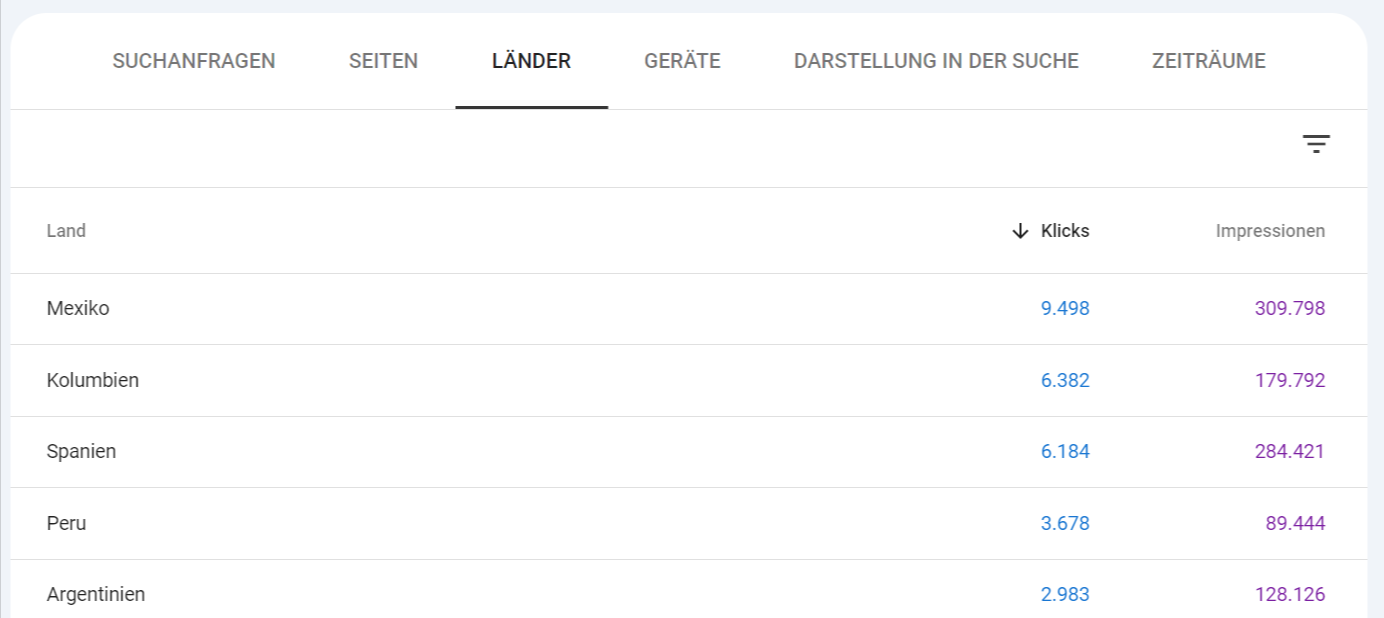
<link rel="alternate" href="https://www.example.com/es/" hreflang="es" />Here, the page would be displayed for all Spanish-speaking users, regardless of their location. We also do this with TutKit.com, only providing the language code without an additional country code. In the Search Console, we can then simply filter the pages with the URL /es to determine how the distribution of clicks and impressions looks across different countries.
Areas of application for the Hreflang attribute
Different language versions of a website
The Hreflang attribute is particularly useful for websites that offer content in multiple languages. For example, if your website has both an English and a German version of a page, the Hreflang attribute helps search engines understand which version should be displayed to which users. The attribute ensures that users see the page in their preferred language, significantly improving the user experience.
Example: You operate an e-commerce website that could also offer and ship products internationally. You can provide your online shop in German, as well as in English and other languages of your target markets. With Hreflang, you ensure that German users are redirected to the German page (hreflang=”de”) and English-speaking users are directed to the English page (hreflang=”en”).
Regional targeted communication
In addition to language distinction, the hreflang attribute can also be used to deliver content specifically to users in certain countries or regions. This is especially important when your website has content aimed at different regional markets, even if the language is the same.
An example of this would be a page that is in English for users in the USA and a separate page in English for users in the UK. Although both pages are in the same language, they may be tailored due to differences in legal situations, currencies, or cultural differences. Here, the hreflang attribute would look like this:
<link rel="alternate" href="https://www.example.com/en-us/" hreflang="en-US" />
<link rel="alternate" href="https://www.example.com/en-gb/" hreflang="en-GB" />
This setup helps ensure that US users see the page tailored for the US market and British users see the page optimized for the UK.
Avoidance of Duplicate Content
With the hreflang attribute, you are able to counter the detrimental effects of duplicate content caused by identical pages in the same language of a website. When a website provides similar or identical content in different language or country versions, search engines might perceive this as duplicate content. This can lead to negative impacts on the ranking in search results.
The hreflang attribute signals to search engines that these are alternative versions of the same page intended for different target audiences. This minimizes the risk of duplicate content and increases the likelihood that the correct version of the page will be displayed in search results.
Implementation of the Hreflang attribute
The implementation of the hreflang attribute can be done in several ways, depending on the structure and requirements of the website:
- In HTML code: Simple and direct for static websites.
- In HTTP headers: Useful for non-HTML resources or when HTML code is difficult to access.
- In XML-Sitemaps: Efficient for large websites, as Hreflang is centrally managed.
- In combination with canonical tags: To avoid conflicts and ensure correct indexing by search engines.
Google itself stated in its Podcast SEARCH OFF THE RECORDS am 25. Juli 2024 that theoretically it doesn’t matter where the hreflang information is provided, whether in HTML, HTTP headers, or sitemaps. Also see the embedded video below.
In the HTML code
The most common method for implementing the hreflang attribute is to add it directly in the HTML code of a webpage. The hreflang attribute is added within the section of the page. This method is particularly useful for static websites where the content does not change frequently.
A typical example looks like this:
<head>
 <link rel="alternate" href="https://www.example.com/de/" hreflang="de-DE" />
 <link rel="alternate" href="https://www.example.com/en/" hreflang="en-US" />
 <link rel="alternate" href="https://www.example.com/fr/" hreflang="fr-FR" />
</head>
In this example, a separate tag with the corresponding hreflang attribute is provided for each language and country version of the page. Each version of the page should also reference all other language versions to ensure consistent linking.
In HTTP headers
A less commonly used but still useful method to implement the hreflang attribute is through HTTP headers. This is especially helpful when access to the HTML code of a page is limited or when it is a non-HTML resource, such as a PDF file or when your website is entirely created using JavaScript.
An HTTP header with Hreflang could look like this:
Link: <https://www.example.com/de/>; rel="alternate"; hreflang="de-DE"
Link: <https://www.example.com/en/>; rel="alternate"; hreflang="en-US"
However, this method requires access to the server configuration and is therefore more suitable for advanced users or specific use cases.
HREFLANG in XML Sitemaps
The hreflang attribute can also be implemented in XML sitemaps, which is particularly beneficial for large websites with many pages. This method is efficient and reduces effort, as the hreflang information can be managed centrally instead of embedding it in the HTML code of each individual page.
An example of the implementation in an XML sitemap:
<url>
 <loc>https://www.example.com/de/</loc>
 <xhtml:link rel="alternate" hreflang="de-DE" href="https://www.example.com/de/"/>
 <xhtml:link rel="alternate" hreflang="en-US" href="https://www.example.com/en/"/>
 <xhtml:link rel="alternate" hreflang="fr-FR" href="https://www.example.com/fr/"/>
</url>
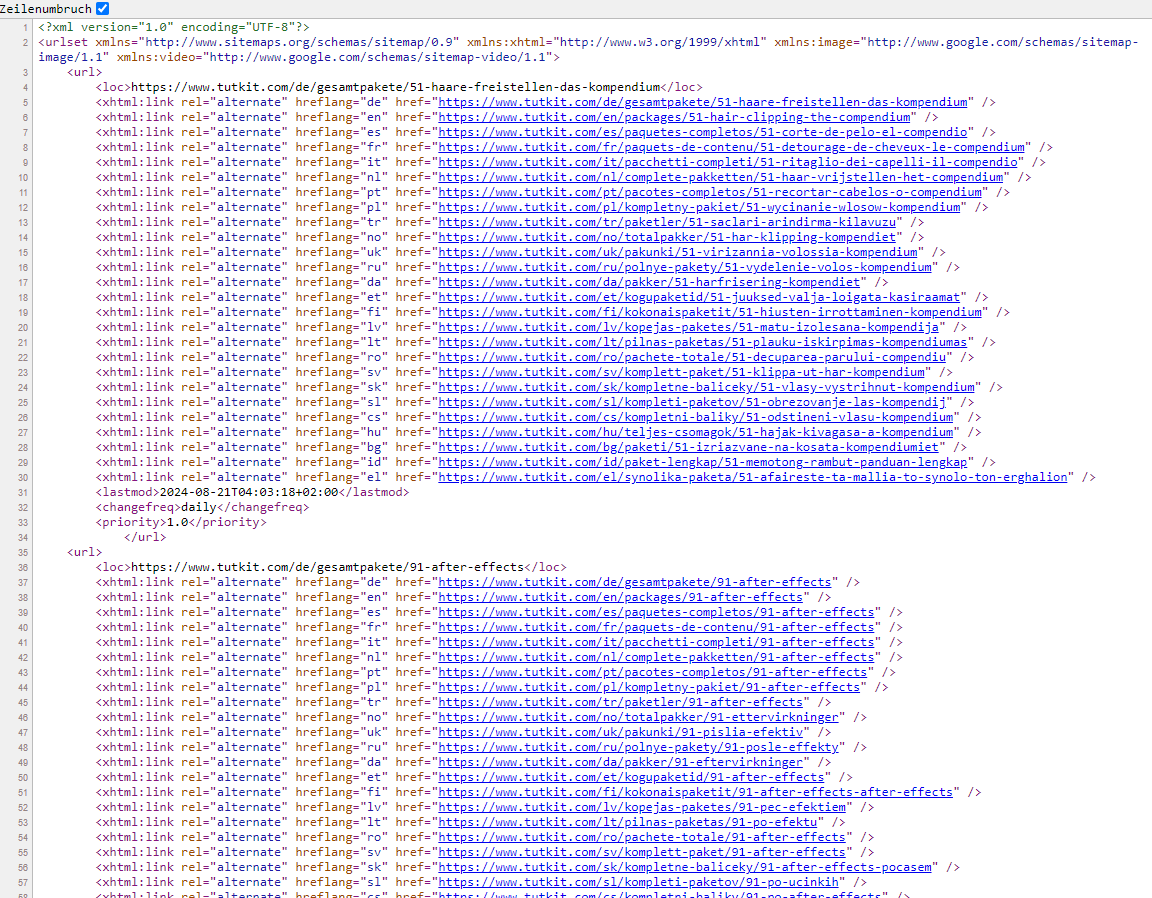
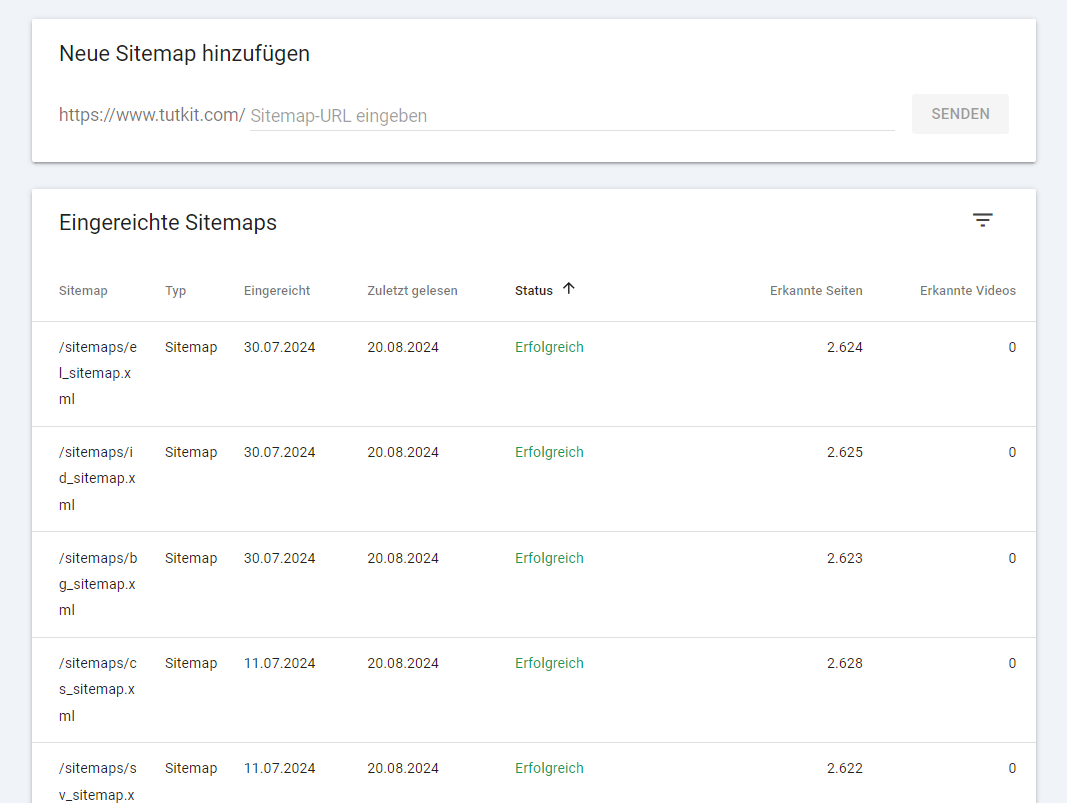
This method has the advantage of managing all hreflang attributes in one place, which makes maintenance and updates easier. Additionally, the XML sitemap is processed efficiently by search engines. This is also the main reason why we chose to implement hreflang through the XML sitemap for our project TutKit.com. Another reason was that with the numerous languages (currently 26!), we did not want to excessively fill the HTML code. The approach through the XML sitemap requires a one-time implementation and ensuring that all new pages are also integrated. After that, it runs automatically. The sitemap should be submitted in the Google Search Console so that Google can quickly index the new pages.
This is what it looks like for us … we have a separate sitemap for each language. Each URL refers to the other language versions. This is the sitemap for the German language:
Use of Canonical Tags in Combination with Hreflang
It is important to correctly use the Hreflang attribute in conjunction with Canonical Tags to avoid potential SEO issues. A Canonical Tag signals to search engines which version of a page is considered the “canonical” or primary version. This is particularly relevant when multiple pages have similar content.
The general rule is: When multiple language versions of the same page exist, each page should reference itself as well as the other language versions using Hreflang. The canonical tag should point to the appropriate language version of the page.
An example:
<link rel="canonical" href="https://www.example.com/de/" />
<link rel="alternate" href="https://www.example.com/de/" hreflang="de-DE" />
<link rel="alternate" href="https://www.example.com/en/" hreflang="en-US" />
In this case, the German version of the page refers to itself via the Canonical Tag, while the Hreflang attribute refers to the English version of the page.
You can skip the use of rel=”alternate” hreflang tags in the HTML code if you have already implemented them in the XML sitemap, as shown in my example above. A nice side effect: This helps to reduce code bloat. Removing rel=”alternate” tags from the HTML code reduces the file size and may make the page load a bit faster.
It is important that the sitemap is correctly set up and accessible. So check whether the Search Console indicates the submission status as “successful.”
Best Practices for Using Hreflang
To ensure that the hreflang attribute functions optimally, you should observe the following best practices:
- Proper mapping of language and country codes: Use the correct and necessary ISO codes.
- Consistency in implementation: Ensure that all language versions of your site are correctly and completely linked.
- Dealing with cross-border and multilingual websites: Adjust your hreflang strategy to the specific requirements of your target markets.
- Avoiding pitfalls: Be attentive and avoid common mistakes to ensure a clean implementation.
By following these guidelines, you can maximize the effectiveness of the hreflang attribute and ensure that your website is internationally successful.
Correct mapping of language and country codes
A correct mapping of language and country codes is essential to ensure that search engines correctly assign your pages. Errors can lead to users being directed to the wrong version of your website, which can impair the user experience. Just imagine a Swiss user visiting a German online shop and seeing euros everywhere as the currency. They expect Swiss francs, and the risk is high that they will leave the page immediately.
Therefore, use correct ISO codes. Always use the official ISO 639-1 Codes für Sprachen and ISO 3166-1 Alpha-2 Codes für Länder. For example, “de” stands for German and “DE” stands for Germany, while “en” stands for English and “US” stands for the United States.
Avoid unnecessary combinations. Only use the language-country code combinations that you truly need. If your site is meant to address all German-speaking users, regardless of the country, using hreflang=”de” is sufficient instead of hreflang=”de-DE”. We do this with TutKit.com as well, and it works very well with the traffic to the non-German pages, which has now surpassed the German-speaking traffic.
Make sure to use the hreflang attribute consistently on all pages of your website. Inconsistencies can confuse search engines and lead to problems. Therefore, you should rely on an automated solution, which you can achieve either through programming or with a plugin. Errors are too easily made with manual maintenance.
Consistency in implementation
It is important that you implement the Hreflang tags correctly on each page and ensure that all language versions are linked together. If you need help creating the HREFLANG attributes, you can find an online tool here HREFLANG Tags Generator. You can later validate your implementation with an HREFLANG validator. More on that below.
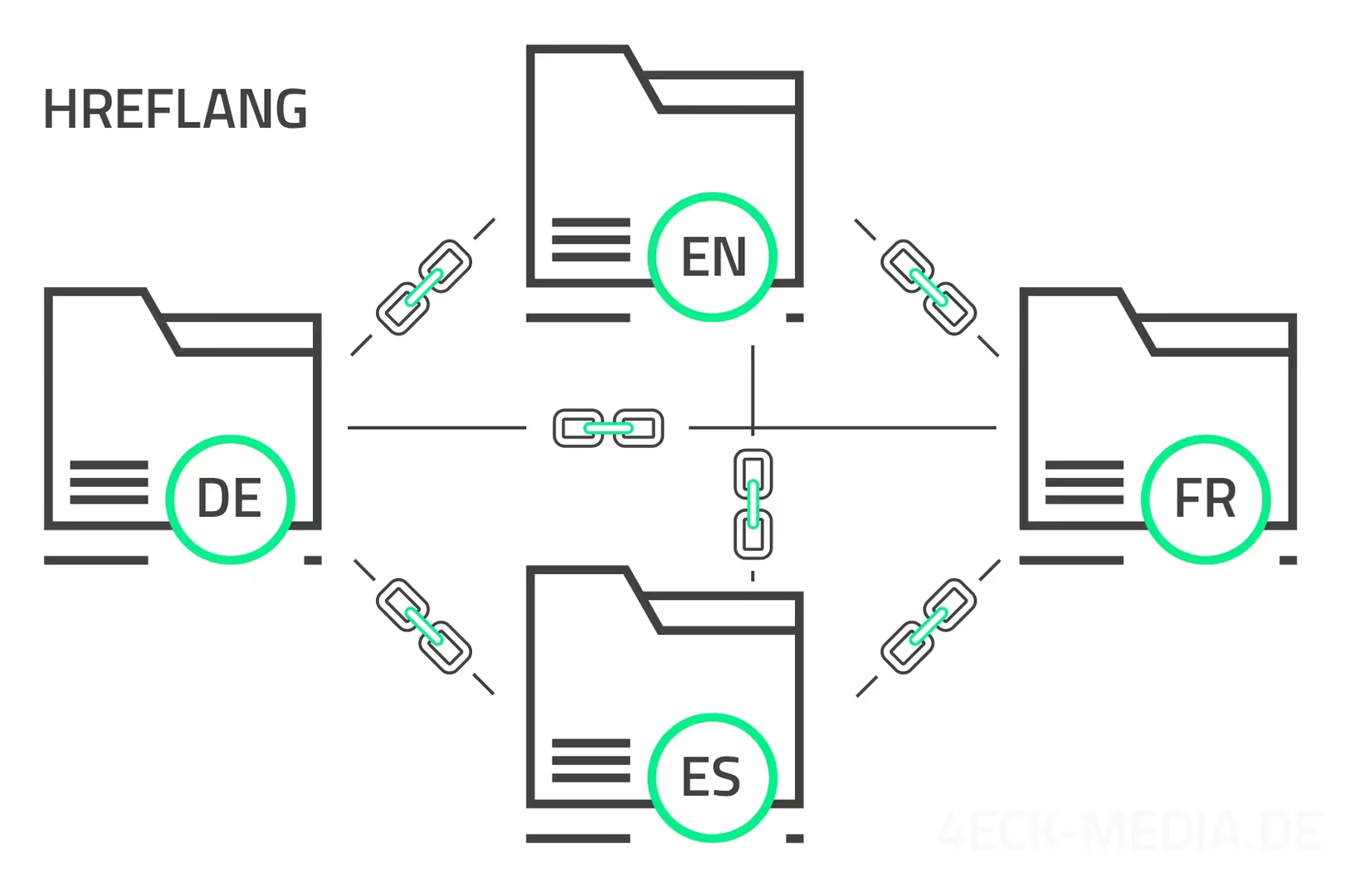
Each language version of your site should link to all other language versions, which is referred to as bidirectional linking. If the German version refers to the English version, the English version should also refer to the German version.
Make sure that the hreflang attribute is implemented on all relevant pages of your website, not just on the main pages.
Make sure that your hreflang tags do not link to error pages (e.g. 404 pages) or point to non-existent URLs. This could have a negative impact on your SEO.
Dealing with cross-border and multilingual websites
If your website targets users in multiple countries or with different languages, a well-thought-out hreflang strategy is essential from an SEO perspective and to ensure a high user experience. Consider carefully how to organize the content for different target audiences. Here are a few recommendations from our experiences:
- Use separate URLs for the different language and country versions whenever possible, e.g. https://www.example.com/de/ for German and https://www.example.com/fr/ for French. This simplifies the implementation and management of the hreflang attribute. We do it this way, as mentioned above, also with TutKit.com. Also, take a look at my blog post on URL-Struktur bei mehrsprachigen Projekten.
- Only when your site is tailored to be both linguistically and regionally different (e.g., English for the UK and English for Australia), should you adjust the hreflang attribute accordingly (hreflang=”en-GB” for the UK, hreflang=”en-AU” for Australia). Otherwise, the pure language variant without a regional code is sufficient.
- If you are unable to offer a specific language or country version for certain pages, provide a general fallback version (hreflang=”x-default”), e.g., a globally oriented English page (hreflang=”en”). For example: If your Italian user is on a German page and wants to display it in Italian using the website’s language switcher, the English version should appear if no Italian page is available. At TutKit.com, we have even implemented it so that when you are on a subpage, only the languages for which a translation is available are displayed in the language switcher.
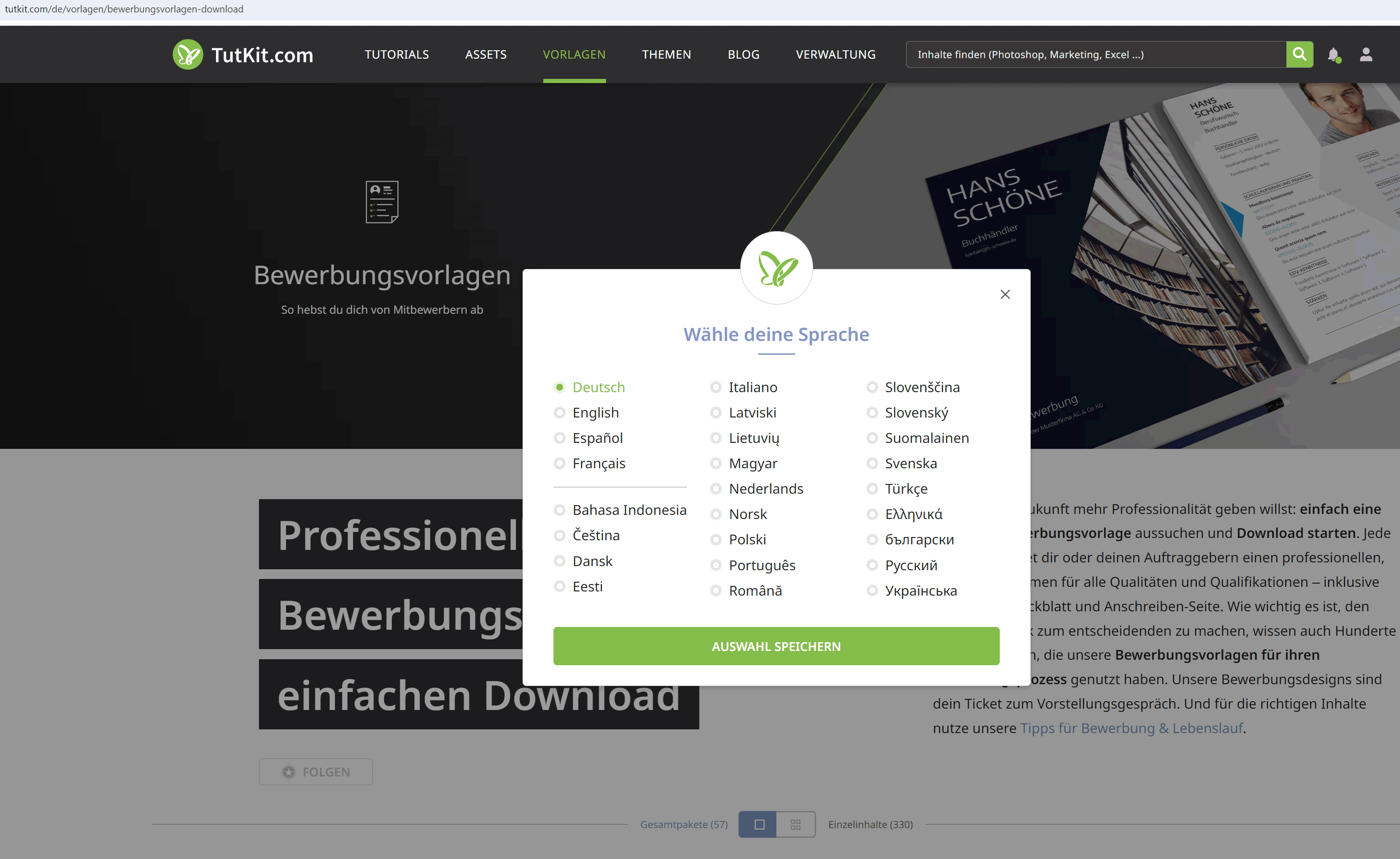
The language switcher only displays the languages for which there is a translated version of this category page.
Understanding and Implementing the hreflang=”x-default” Attribute
The hreflang=”x-default” attribute is used to specify a general, default version of a webpage that is displayed when no specific language or country version of the page is available. It serves as a fallback version and is particularly useful to ensure that users see a relevant page when their language or region is not covered.
The hreflang=”x-default” attribute is important because it helps search engines display a universal version of the webpage when no more specific version is available. It ensures that users do not land on an empty or irrelevant page, but rather see a page that best meets their needs when no more precise option is available.
Example: If your website offers a general English version as the default for all markets not specifically covered, you can use the hreflang=”x-default” attribute to ensure that this version is displayed when a specific language or country version is not available.
The hreflang=”x-default” attribute is added to thesection of your HTML page or used in your XML sitemap. It should point to the most general version of your page, serving as a fallback for all unspecified languages or regions.
HTML example:
<head>
  <link rel="alternate" hreflang="en" href="https://www.example.com/en/" />
  <link rel="alternate" hreflang="de" href="https://www.example.com/de/" />
  <link rel="alternate" hreflang="x-default" href="https://www.example.com/" />
</head>
XML Sitemap Example:
<url>
  <loc>https://www.example.com/</loc>
  <xhtml:link rel="alternate" hreflang="en" href="https://www.example.com/en/" />
  <xhtml:link rel="alternate" hreflang="de" href="https://www.example.com/de/" />
  <xhtml:link rel="alternate" hreflang="x-default" href="https://www.example.com/" />
</url>
Make sure that hreflang=”x-default” points to a page that is relevant for users from all unspecified regions or with unsupported languages. Use hreflang=”x-default” in combination with specific hreflang tags for different languages and regions to ensure comprehensive coverage and better search engine rankings.
Make sure that all language versions and the x-default version are correctly linked to each other. Each page should reference the other language versions and the x-default version to ensure proper indexing.
Avoid pitfalls and common mistakes.
Even though the hreflang attribute offers many advantages, there are some common mistakes that can occur during implementation.
One of the most common mistakes is the use of incorrect language or country codes or the absence of hreflang tags on certain pages. Make sure that all language and country codes are correct and that each relevant page is equipped with the proper hreflang tags.
It is important that all language versions of your page are linked to each other. If the German page refers to the English page, the English page must also refer back to the German page. This bidirectional linking is crucial for the Hreflang attribute to function correctly.
Another common mistake is that canonical tags are not set correctly and conflict with the hreflang tags. Make sure that the canonical tag points to the appropriate language version of the page and does not contradict the hreflang tags.
A faulty head section in the HTML code can also prevent Google from recognizing hreflang tags. This error is particularly unfortunate because it is not displayed as such in the Google Search Console. If Google does not recognize the tag, there is no reason to assume it is an international website. Therefore, make sure not to use any elements that deviate from known meta tags.
If the URLs in your hreflang tags are incorrect, it will also lead to issues. Check that all URLs are exactly correct and that there are no typos or outdated links. This is especially important for large websites with many language versions. Therefore, the system should always automatically set the tags. A few mistakes are not a problem.
If your website has mobile or AMP versions, you should also include Hreflang tags for these so that mobile users see the correct language version.
Hreflang Validators
There are special online tools, like HREFLANG Validator von Sistrix or from Merkle, that are designed to check the implementation of hreflang tags. These tools scan your site and provide feedback on potential errors. The tool also indicates whether errors have occurred in the implementation of the hreflang=”x-default” tag.
Various SEO tools also offer error reports as part of their crawling. The SEO-Tool von Audisto we use, for example, includes the following checks. For us, everything is marked with 0, as we – as mentioned above – control the HREFLANGs through our sitemap. Therefore, we rely on sitemap validation. Especially when your hreflang tags are set through the source code, such tools are essential for monitoring, in case errors creep in later due to refactoring or deployments.
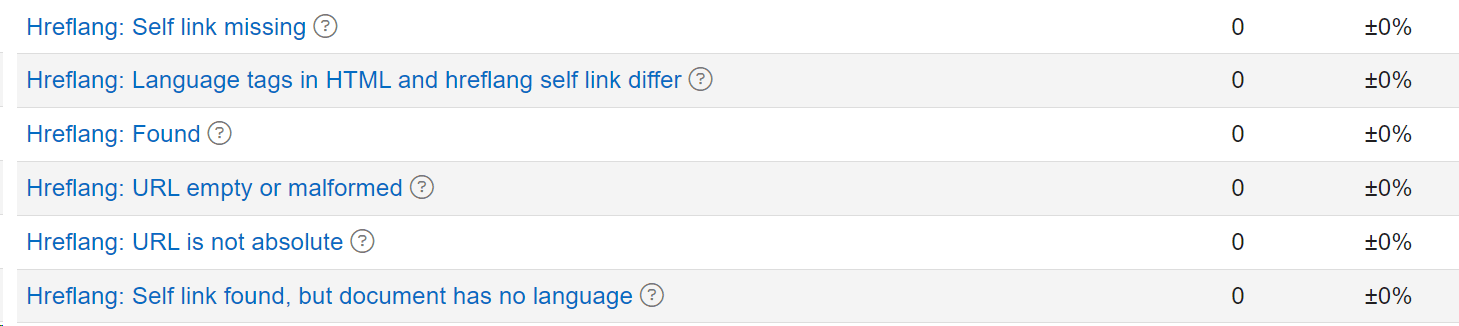
Google about HREFLANG
In connection with multilingualism, also take a look at the Google-Dokumentation über lokalisierte Seiten. An interesting Google Podcast is SEARCH OFF THE RECORD from July 25, 2024, which deals with internationalization and HREFLANG. The core information from this has also been included in this article. A preview was already given that Google is considering automatically recognizing language and regional orientation. Here is the complete episode.
Conclusion on HREFLANG
Thank you for reading this far. I hope you were able to understand that the hreflang attribute is an essential tool for international SEO and multilingual websites. It helps search engines correctly associate and display the relevant language or country versions of a website, thereby improving the user experience for your target audiences and optimizing visibility in search results.