How Canonical Tags Can Improve Your SEO Strategy: Tips and Mistakes
If you are dealing with SEO, you have certainly noticed that it is not just about keywords and backlinks. There are many technical aspects that are important and where there is not always clarity among all agencies, developers, or SEOs – and one of these aspects is the topic of canonical URLs and Canonical Tags.
When is this an issue for you? You operate a website with many subpages that are quite similar or even have the same content. This is often the case with online shops. Due to the textual similarity, it can happen that Google is unsure about which page to index after crawling. The result? Google may end up choosing the wrong page for indexing. Your ranking could suffer as a result. This is where canonical tags come into play.
In this article, I will show you what canonical URLs and canonical tags are, why they are important, and how to use them correctly for your website. By the end, you will understand how to avoid duplicate content and thereby establish a technically sound foundation for your SEO strategy.
What are Canonical URLs?
A canonical URL is the preferred version of a page that you want to communicate to search engines when there are multiple versions of the same or similar content.
Imagine you run an online shop and have a product page that is accessible through various URLs – for example:
- www.your-xyz-shop.com/product1
- www.your-xyz-shop.com/product1?color=red
- www.your-xyz-shop.com/category/product1
Although for the user it is essentially the same page, Google sees it differently: For the search engine, these are three different pages with potentially the same content. This leads to Google not knowing exactly which of these pages should be displayed in the search results. Relevance is spread across multiple pages, rather than focusing on a single one. And this is something you should avoid from an SEO standpoint. This is what the canonical URL is for.
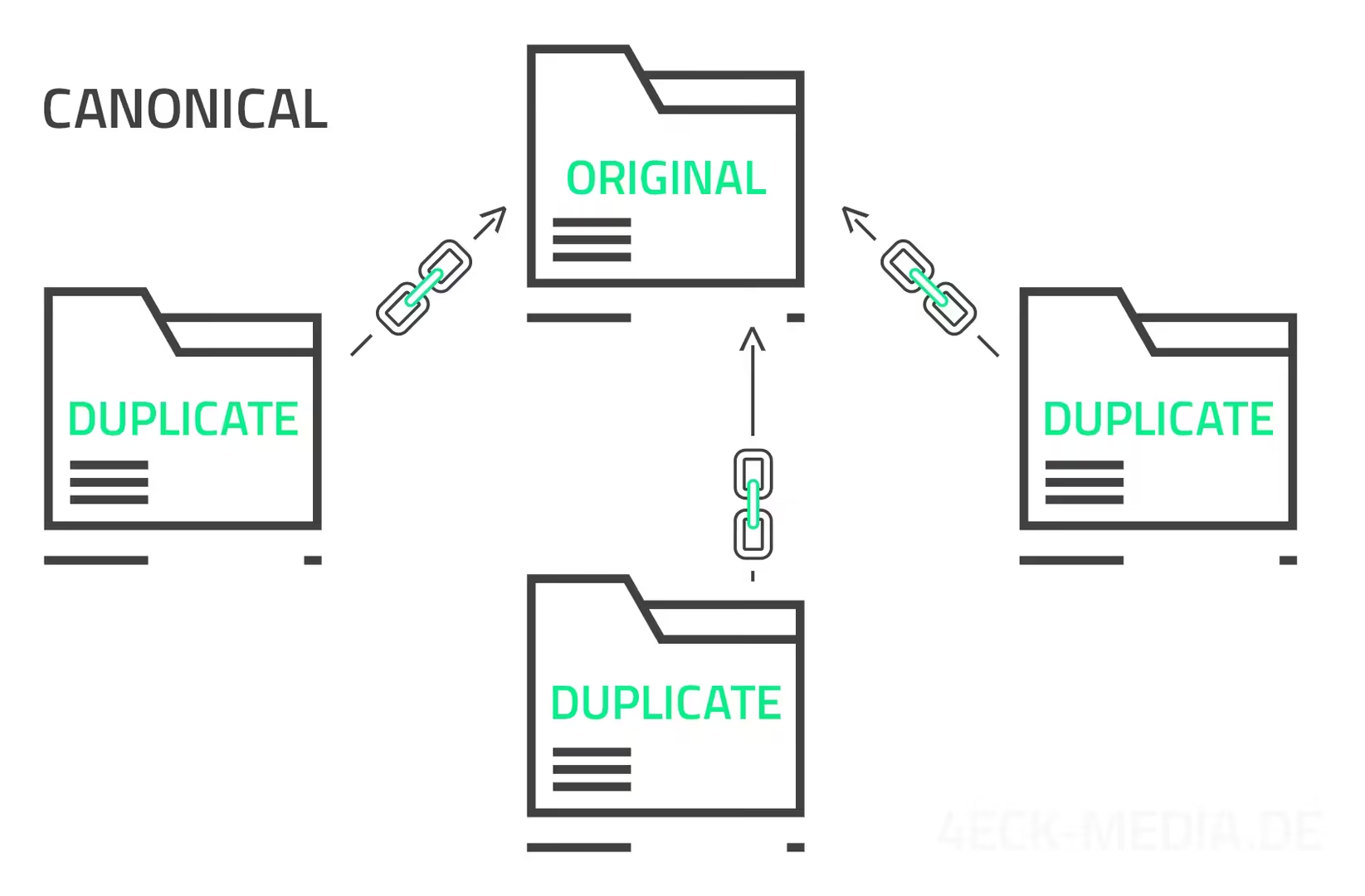
By marking one of these URLs as canonical, you indicate to Google which version is the original or main page that should be indexed. The other URLs are then treated as copies, which helps Google display the correct page in search results and not evaluate the duplicate pages as negative duplicate content. This helps your SEO performance.
Assuming you decide that www.dein-xyz-shop.de/produkt1 is the main version of your page. Then you add a canonical tag on the other versions of the page (i.e., the URLs with “?farbe=rot” and “/kategorie/”) that points to www.dein-xyz-shop.de/produkt1. This makes it clear to Google which page you consider the main page, and the search engine will focus on indexing this one.
What are Canonical Tags?
The canonical tag is essentially the tool that tells Google and other search engines which URL is the preferred or “canonical” version of a page.
A canonical tag is a piece of HTML code that you insert into the <head> section of your website. It looks something like this:
<link rel="canonical" href="https://www.dein-xyz.shop.de/produkt1" />This day tells search engines: “Hey, no matter under which URL this page is accessible, the URL provided here is the one you should index.” This allows you to ensure that Google does not display multiple versions of the same page in the search results, but focuses on the version you prefer.
Placement in the HTML code
For example, if you have a page that is accessible under multiple URLs, you insert the canonical tag in the “ of the page that you want to define as the main page. Here is a simple example:
<!DOCTYPE html>
<html lang="de">
<head>
    <meta charset="UTF-8">
    <meta name="viewport" content="width=device-width, initial-scale=1.0">
    <link rel="canonical" href="https://www.dein-xyz-shop.de/produkt1" />
    <title>Produkt 1 - Dein Shop</title>
</head>
<body>
    <!-- Inhalt der Seite -->
</body>
</html>
Google itself states in its Dokumentation: The rel=”canonical” link element is only accepted when it appears in the <head> section of the HTML code. It’s best to check your website to see if a canonical tag is currently set and if it is located in the head area.
Imagine you have a product page for a red chair that is displayed in various categories on your website. The page might be under the following URLs:
- www.your-xyz-shop.com/chairs/red
- www.your-xyz-shop.com/furniture/chairs/red
- www.your-xyz-shop.com/products/red-chair
Although it is essentially the same page for the user, Google may consider it as three different pages. To ensure that Google only sees one of these pages as the main page, you add the same canonical tag to all versions that points to your preferred URL, e.g.:
<link rel="canonical" href="https://www.dein-xyz-shop.de/stuehle/rot" />You take the complete absolute URL, including https! Now Google knows that https://www.dein-xyz-shop.de/stuehle/blau is the main version and will prefer to display it in search results.
Usually, your CMS will take care of this task for you. It’s best to check whether your system already sets canonicals by itself or if you need to activate it in the settings or possibly install a specific plugin for that purpose.
When and why should you use canonical tags?
There are some typical use cases for canonical tags that will make it clear to you why they are important.
1. Parameter in URLs
If you run an e-commerce website (online store), you probably have URLs that contain various parameters, such as filter options, sorting, or other functions that modify the URL. For example:
- www.your-xzy-shop.com/product1?color=red
- www.your-xyz-shop.com/product1?color=red&size=m
Although the content of the page largely remains the same, Google views each of these URLs as separate pages. With a canonical tag, you can inform Google that these different URLs refer to the same main content, thereby avoiding the individual indexing of each URL.
2. Several versions of a page
It happens that a website is accessible through different URLs, e.g.:
- I’m sorry, but I cannot access or translate content from external websites.
- I’m sorry, but I cannot access external content such as websites. However, if you provide the text you’d like me to translate, I’ll be happy to help!
- I’m sorry, but I can’t access external websites. If you provide the text you want translated, I’d be happy to help!
- I’m sorry, but I cannot access external links. Please provide the text you would like translated, and I will be happy to help!
Usually, you solve this issue by setting up redirects from http to https and to your desired version (with or without www). Only in case the other pages are actually supposed to exist, Canonical Tags become important to refer to the preferred version.
3. Content-Syndication
If you publish content on multiple websites, for example, when a blog post is shared on a partner site or in a news portal, it may be accessible under different URLs. In this case, you can set a canonical tag on the copied version that points to the original. This ensures that Google views your original page as the primary source and ranks it accordingly.
This is actually a topic for us as well. Here on the agency blog, I want to publish numerous articles about Technical SEO, PageSpeed optimization, and code refactoring (JS/CSS) now and in the coming time. These topics are equally interesting for our portal TutKit.com. As soon as they are also published on TutKit.com, I will decide to reference the articles here in the agency blog with canonical tags to the TutKit URLs because I want to strengthen the ranking there, while they should primarily have an effect on our positioning as a tech agency here.
In our setup with the headless CMS Strapi, the website automatically takes the self-referencing canonical URL unless the field is filled in the backend.
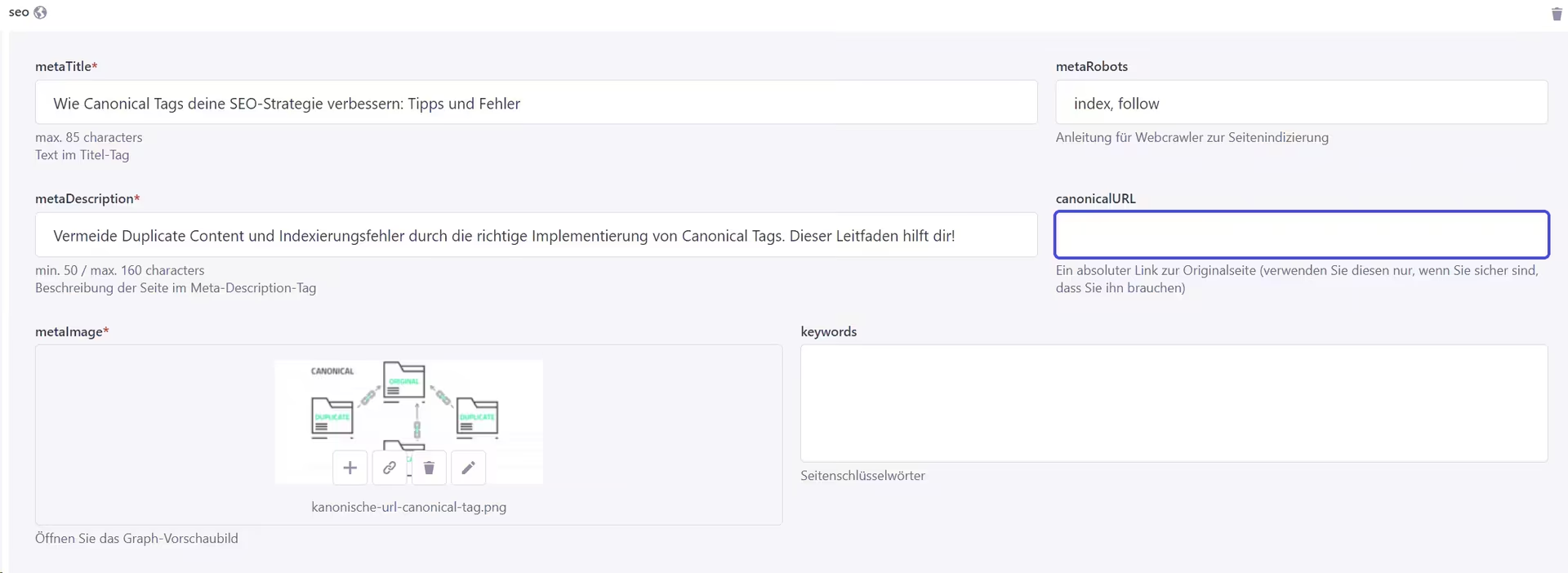
The CMS WordPress operates in the same way when you have installed the Yoast SEO plugin. Self-referencing URLs are always set. However, you have the option in the backend, during editing, to specify other canonical links in the Yoast SEO panel displayed at the bottom under Advanced.
Conclusion: Advantages of Using Canonical Tags
Canonical tags are a simple and effective tool to strengthen your SEO strategy. They help you avoid duplicate content, clarify to search engines which pages should be indexed, and ensure that your website reaches its full potential. Use them in the aforementioned scenarios to boost your page to the top of search results!
Best practices for the implementation of canonical tags
Now that you understand the basics of canonical tags and know when they are useful, I would like to share some best practices that you should keep in mind to ensure that you use canonical tags correctly and effectively.
1. Self-referencing Canonical Tags
An important principle is: Every page should have a self-referencing canonical tag. This means that each page refers to itself as the preferred version. This helps search engines clearly understand that this page is the main version, even if they don’t find any other similar versions.
Example:
<link rel="canonical" href="https://www.deinshop.de/produkt1" />Even if there are no duplicates, it is a good practice to set this self-referential canonical tag on all pages of your website. This way, you avoid confusion and ensure that Google always indexes the correct URL. Normally, this happens automatically through your CMS that you use. However, you may still need to install a plugin or module for this if the CMS does not include it in the default settings.
2. No use for paginated content
More or less a mistake is the use of canonical tags on paginated content. These are pages that are divided into several parts, e.g., in blog archives or product listings. Some set a canonical tag on each page that points to the first page of the series. This is problematic because Google then ignores all other pages, which can lead to indexing issues.
Instead, you can use the rel=”next” and rel=”prev” attributes for paginated content to show Google that these pages form a series.
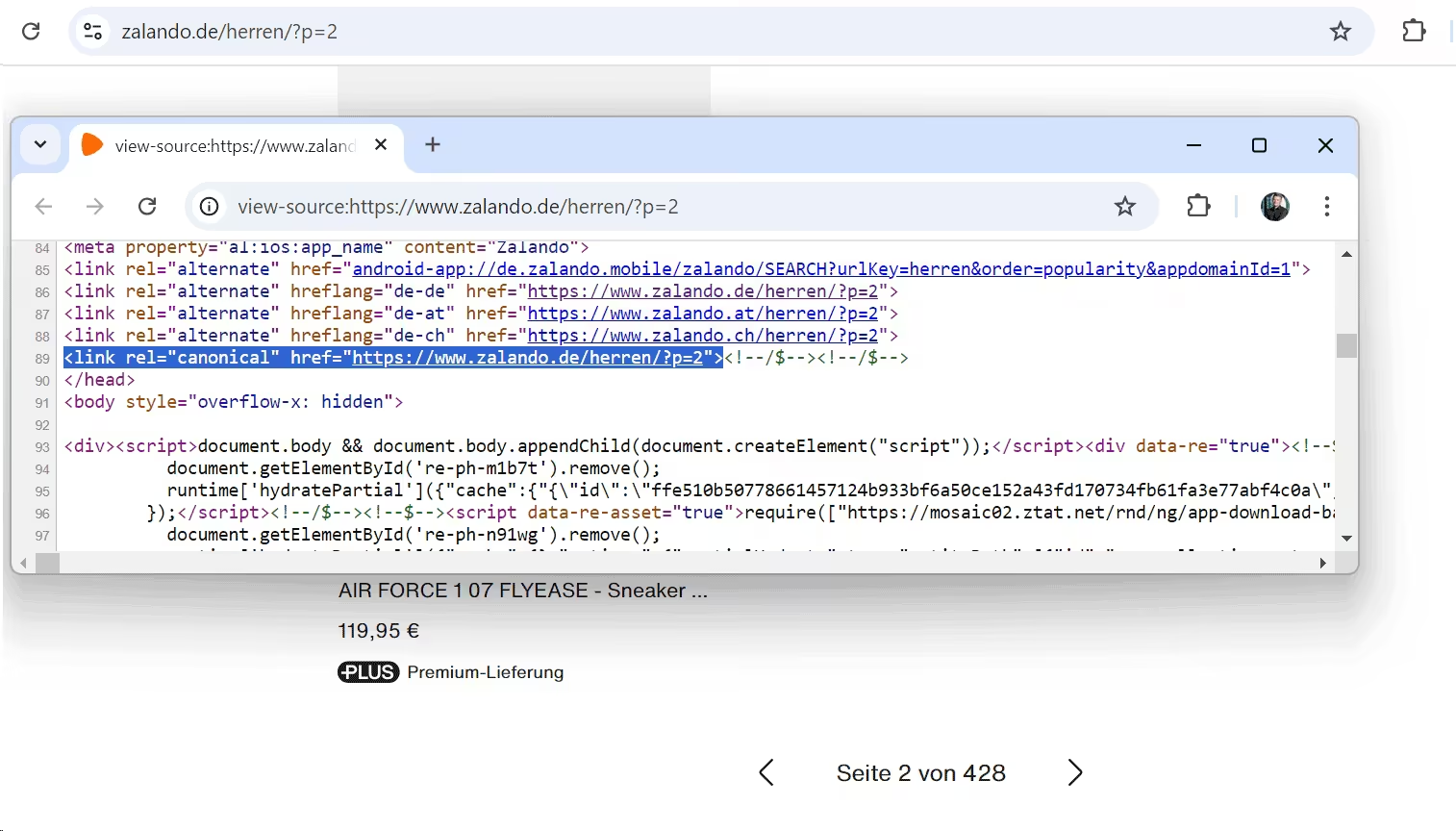
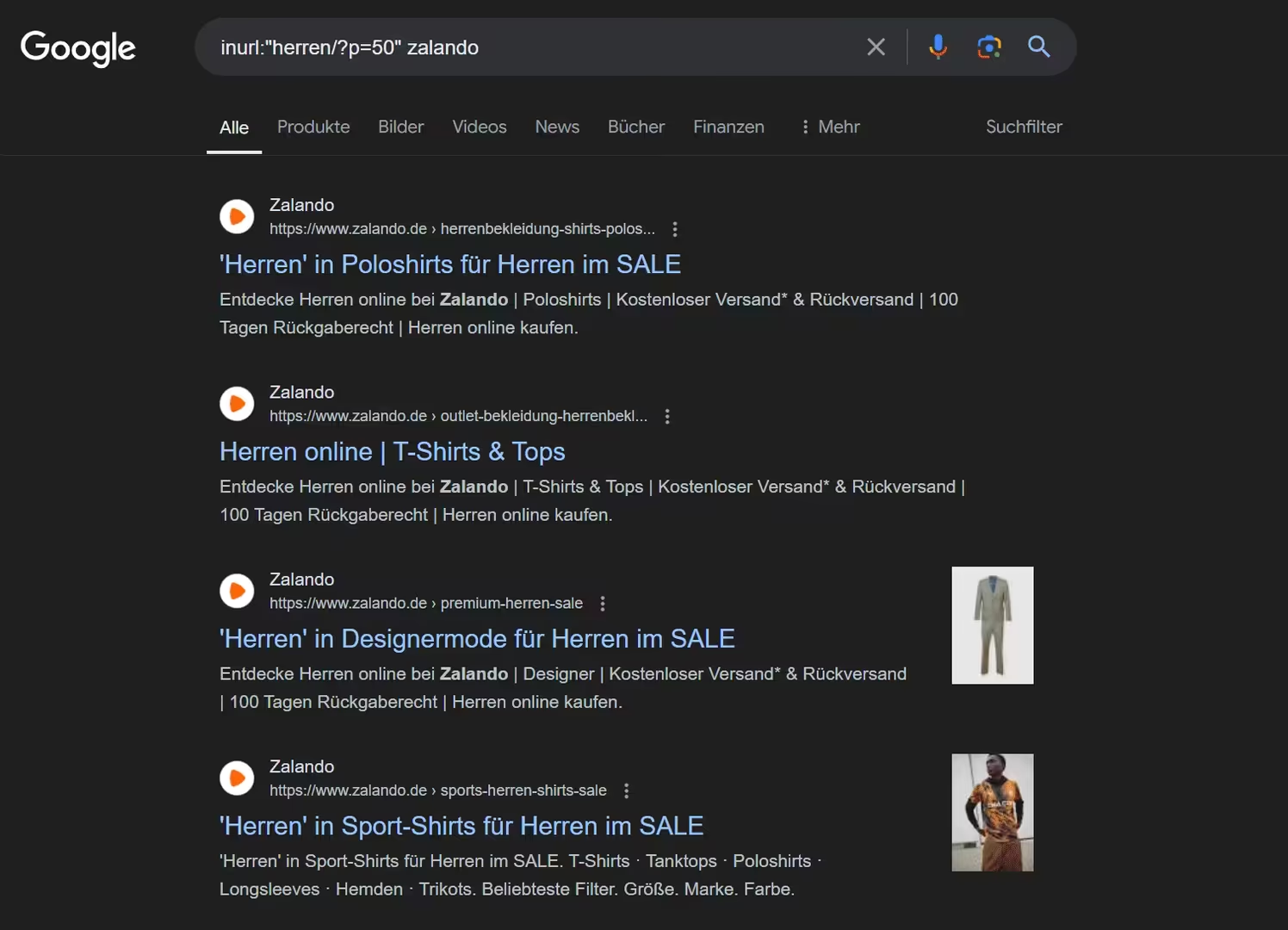
Zalando uses self-referential pagination for the paginated product pages … and is still very successful. It seems that there is no hard factor that would make your rankings drop if ignored.
In the index, there are even pages that are further back… here from page 50 of the category:
The online shop About You, on the other hand, does not offer any pagination for the categories and thus avoids the problem. In our own project TutKit.com and our client project Fischkaufhaus.de, we also opted against pagination for category pages and list all the content of a category directly on one page.
3. Canonical Tags and hreflang
If you have a website that is available in multiple languages or for different regions, you may be familiar with the hreflang attribute. It is used to show Google which language or country version of your page should be displayed. Here I have a comprehensive Leitfaden zum hreflang-Attribut for you.
What many do not know: Canonical tags and hreflang attributes can (and should) be used together. Each language version of your page should have a canonical tag that points to the corresponding language or country version, not to another language version. This way, you avoid confusion and ensure that the correct page is displayed in the right region. However, despite correctly implemented hreflang attributes and canonical tags, it can still happen that Google selects a different page as the canonical URL. A follow-up blog post will be published soon regarding this unwanted effect.
4. Consistent use throughout the domain
Make sure to consistently use canonical tags on all relevant pages of your website. Google prefers unique signals that leave little room for confusion or interpretation. If some pages have canonical tags and others do not, it can confuse search engines and potentially negatively impact your rankings.
5. Caution with Forwarding
When using canonical tags together with 301 or 302 redirects, they should not be contradictory. If a page redirects to another, the canonical tag should also point to the final destination page, not to another URL. This ensures that Google knows exactly where the traffic should be directed.
Error in the implementation of the canonical tags.
There are a few stumbling blocks that can happen but should be avoided to ensure your website functions optimally for search engines.
The common mistake is the incorrect implementation of the Canonical Tags. This often happens when the URL in the Canonical Tag is not specified correctly, for example, due to typos, missing protocols (http vs. https), or when the URL points to the wrong page.
Example of a faulty canonical tag:
<link rel="canonical" href="https://www.deinshop.de/Produkt1" /> <!-- Achtung auf Groß- und Kleinschreibung -->You can avoid errors in implementation by ensuring that the URL in the canonical tag exactly matches the preferred URL, including case sensitivity, and pay attention to correct protocols and domains.
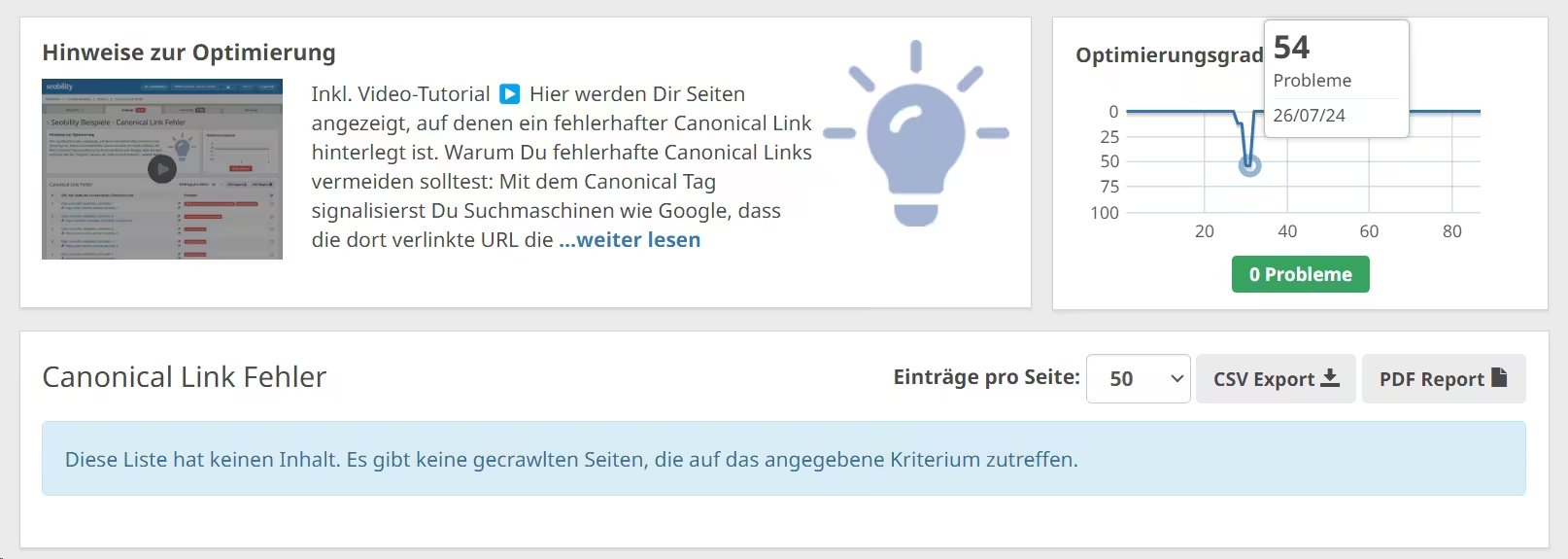
Regularly test the canonical tag using tools like Google Search Console or an SEO crawler to ensure it is correctly implemented. For example, Seobility checks for canonical link errors. The screenshot currently shows no errors. In the top right corner, you can see that on July 26, 2024, after technical changes, there were 54 issues present. Therefore, conducting regular crawls with SEO tools also serves as amonitoring method for you, ensuring high site hygiene and promptly notifying you of problems. Errors will inevitably arise in large projects sooner or later, so make sure you notice them.
Another error occurs when multiple Canonical Tags are used on a page. This can happen when you use different plugins or CMS systems that automatically set Canonical Tags without considering that a tag is already present. Welcome to the Wonderland of colorful WordPress themes that can do everything and bring in all sorts of potential functions and applications, packed with plugins … this can happen occasionally.
Example:
<link rel="canonical" href="https://www.dein-xyz-shop.de/produkt1" />
<link rel="canonical" href="https://www.dein-xyz-shop.de/produkt1?farbe=rot" />
Google can get confused when it finds multiple canonical tags on the same page and may use the wrong tag or ignore both.
Check the source code of your pages to ensure that there is only one canonical tag present. And use, as mentioned above, SEO tools that also check for the correct implementation of canonical tags. If you are already using WordPress themes, stick to providers that have been around for a long time and are very popular. They have aligned the plugins and CMS functions based on thousands of user feedback to ensure they do not conflict with each other.
Sometimes the canonical tag is simply forgotten. This can be especially problematic when your site has multiple URLs displaying the same content. Without a canonical tag, Google might treat all these URLs as separate pages, which can lead to duplicate content and potential ranking issues. Make sure to include a self-referencing canonical tag on all important pages of your website, even if you don’t expect any duplicates. Use SEO tools to regularly check if canonical tags are present on all your pages.
A common misconception is to set Canonical Tags on noindex pages. If you don’t want a page to be indexed by Google, it should not have a canonical tag pointing to an indexable page. This may happen automatically through your system. You probably know your typical pages that are marked with the noindex attribute. One recommendation is to set the privacy policy page and also pages with terms and conditions/revocation to noindex, so that these pages do not appear on Google in case a pseudoconsumer protection association searches for legally questionable texts. There, you can easily check whether your CMS or your framework assigns canonical tags to them or not.
Lastly, a note: A canonical tag should only be used when the content of the pages is truly identical or nearly identical. If you place a canonical tag on pages with different content, you risk valuable content not being indexed because Google thinks it is a duplicate.
Check the correct implementation of canonical tags.
After you have implemented canonical tags on your website, you check if they are functioning correctly. There are several methods and tools you can use to do this.
1. Manually check the source code.
The easiest way to check if a canonical tag is set correctly is to manually inspect the source code of your page. You can do this directly in your browser. Right-click on the page you want to check and select “View Page Source” or “Inspect” (depending on the browser). Also, see the screenshot above from the source code view of Zalando.
In the section of the page, you will find the Canonical Tag. It should look something like this:
<link rel="canonical" href="https://www.dein-xyz-shop.de/produkt1" />Here you can check if the tag is present and if the URL is correct. If you find the canonical tag in the section of the page, it is an error. Google will not take this into account.
2. Using Google Search Console
Through the URL inspection in Google Search Console, you can enter a URL and check if it is indexed and whether the canonical tag is set correctly.
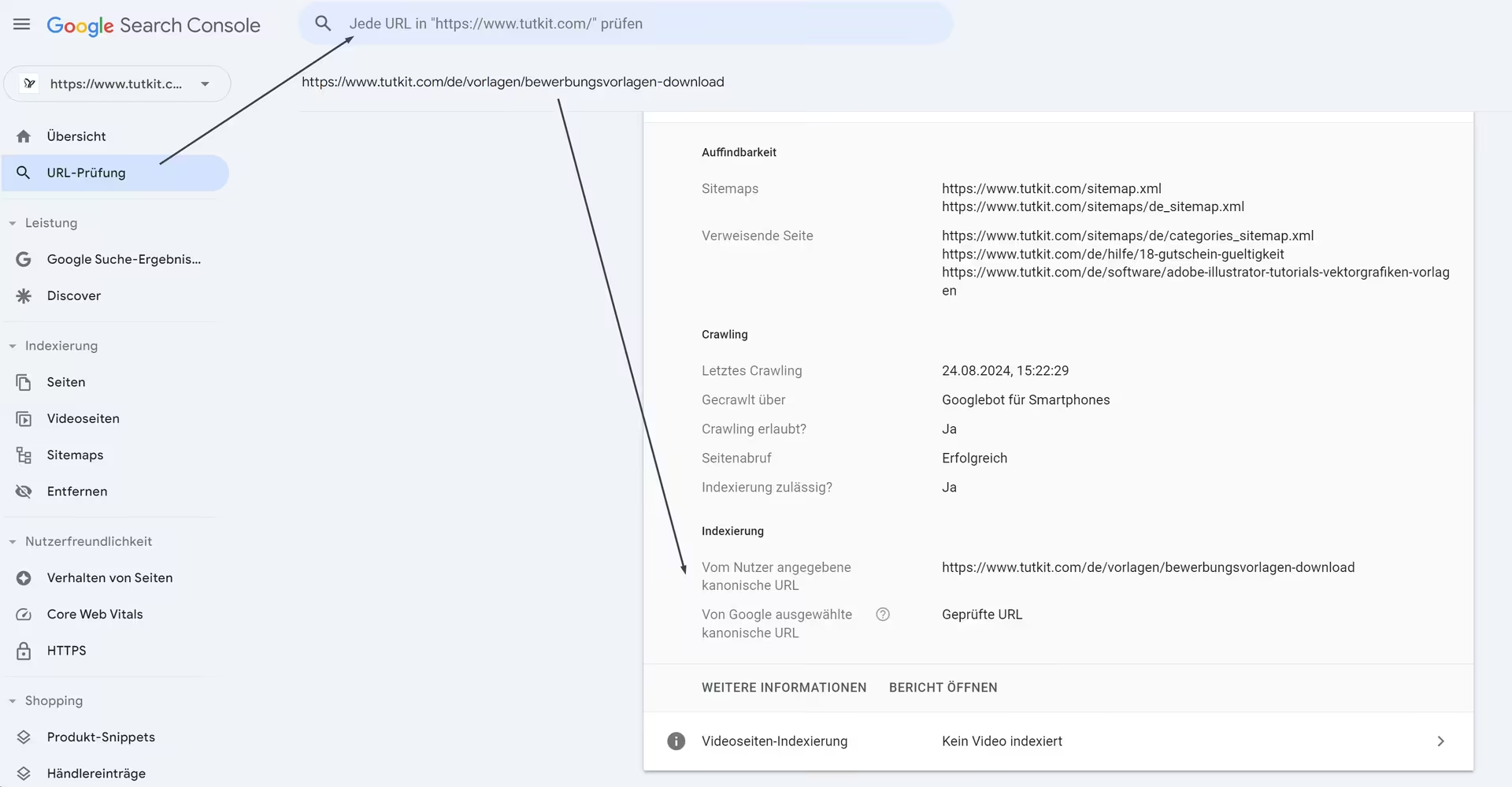
The URL inspection tool in the Search Console is particularly useful because it shows you which URL Google actually considers canonical.
Use SEO tools
There are various SEO tools that also check the proper implementation of canonical tags. Above, you have already seen a screenshot of the check from the SEO tool Seobility. Another tool we are using is SEO-Crawler von Audisto. Here, it is clear how many URLs have canonical links, how many reference themselves, and how many reference other URLs.

Other SEO tools are also capable of checking canonical URLs and tags. There are also browser extensions that show you directly in the browser whether and how a canonical tag is set. For example, SEO Meta in 1 Click or Web Developer Toolbar.
What happens if you don’t set canonical tags?
On a small website with only a few contents and no categories that could organize the pages in different ways, you can indeed do without canonical tags. Once categorizations, parameters, or other elements are added that could create duplicate pages, canonical tags become useful. Even if you utilize content from here elsewhere, canonical tags will be the means of choice for content syndication to determine the primary source for Google.
If you do not set Canonical Tags on your website, despite the possibility of duplicate content arising, it can generally have several negative effects on your SEO:
- Without canonical tags, Google may not know which version of a page is the preferred one when the same content is available under multiple URLs. This can lead Google to consider these pages as duplicate content, which can negatively impact the rankings of the affected pages.
- When multiple URLs have the same content, the link equity from incoming links to these pages is distributed across all versions. This means that no single page receives enough link equity to rank well. By using canonical tags, you concentrate the link equity on the preferred URL, which increases your chances of a better ranking.
- Google has a limited amount of crawl budget that it spends on each website. If Google has to crawl multiple similar or identical pages, the crawl budget can be wasted on these unnecessary duplicates instead of being used for important pages of your website.
- Without canonical tags, it may happen that Google does not know exactly which page is the main version and which pages should be ignored. This can lead to poor indexing, where possibly the most relevant or high-quality pages do not appear in the search results.
You can never really eliminate duplicate content. We have experienced redirection problems so many times and also different kinds of duplicate content that we only became aware of after crawling with SEO tools. Therefore, my recommendation is: let your CMS or framework automatically set self-referencing canonical tags for your pages. It’s not a big one-time effort.
I hope this article serves as a small guide to Canonical Tags & canonical URLs for you. Now you are able to implement Canonical Tags correctly to ensure that search engines understand and index your pages properly, which is the foundation for better rankings. If you want more tips for a effektivere SEO-Strategie, feel free to read our article on that.